> ## Documentation Index
> Fetch the complete documentation index at: https://docs.parallelane.com/llms.txt
> Use this file to discover all available pages before exploring further.
# Fetch
> Retrieving remote state without touching the working tree, prune, and event-driven auto-fetch
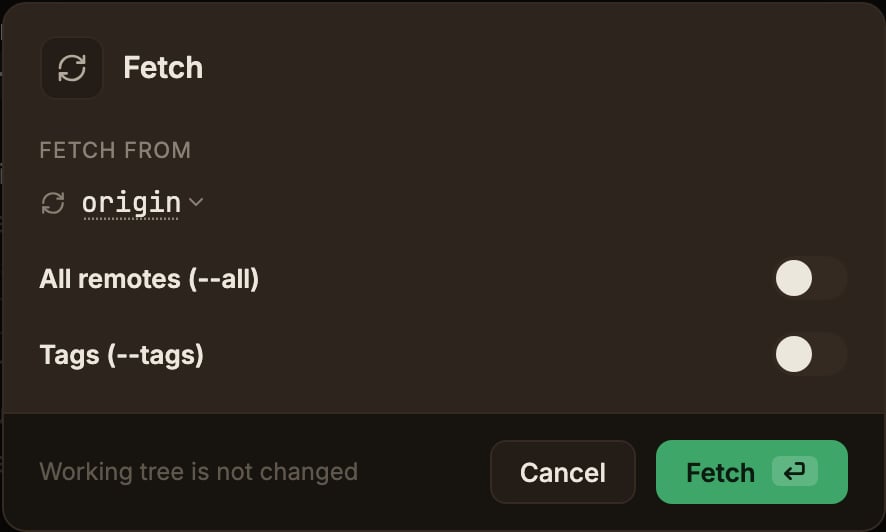
Retrieves the latest state from the remote, but **does not touch the working tree**.
The toolbar's **Fetch** button opens the modal.
* **All remotes (--all)** fetches from every registered remote.
Turning it on replaces the remote dropdown with the plain text `all remotes`.
* **Tags (--tags)** also fetches tags from the remote.
You can change the default in [Settings → ParalleLane → Git](/settings/preferences); a value changed in the modal applies only to that one run.
 Fetch always runs **prune** alongside it, clearing out stale `origin/*` tracking refs for branches deleted on the remote (local tags are not deleted).
To prune a single remote only, use **Clean up branches deleted on remote** in the **Cleanup** menu on the top bar (it only appears in the main worktree).
That dialog carries the same remote dropdown, so you can point it at any remote.
## Event-driven auto-fetch
ParalleLane fetches in the background at these moments:
* when the app window regains focus
* when you switch worktrees or repositories
* right after launching the app or restoring a session
In [Settings → ParalleLane → General](/settings/preferences), switching the **Fetch** setting from **Manual** to **Auto** reveals the **Auto-fetch interval** dropdown.
Choose 10–60 seconds (30 seconds by default); the same worktree is not fetched again within that interval.
Auto-fetch shows no notification on success or failure, and it is skipped when you are offline or have no remote.
The prune and `--all`/`--tags` settings follow the same rules as a manual fetch.
Fetch always runs **prune** alongside it, clearing out stale `origin/*` tracking refs for branches deleted on the remote (local tags are not deleted).
To prune a single remote only, use **Clean up branches deleted on remote** in the **Cleanup** menu on the top bar (it only appears in the main worktree).
That dialog carries the same remote dropdown, so you can point it at any remote.
## Event-driven auto-fetch
ParalleLane fetches in the background at these moments:
* when the app window regains focus
* when you switch worktrees or repositories
* right after launching the app or restoring a session
In [Settings → ParalleLane → General](/settings/preferences), switching the **Fetch** setting from **Manual** to **Auto** reveals the **Auto-fetch interval** dropdown.
Choose 10–60 seconds (30 seconds by default); the same worktree is not fetched again within that interval.
Auto-fetch shows no notification on success or failure, and it is skipped when you are offline or have no remote.
The prune and `--all`/`--tags` settings follow the same rules as a manual fetch.