> ## Documentation Index
> Fetch the complete documentation index at: https://docs.parallelane.com/llms.txt
> Use this file to discover all available pages before exploring further.
# 태그
> lightweight 또는 annotated 태그 생성과 삭제
태그는 커밋 그래프의 **우클릭** 메뉴에서 만들고 지웁니다.
생성은 그래프에서만 가능합니다. 태그를 붙일 커밋을 골라야 합니다.
## 태그 만들기
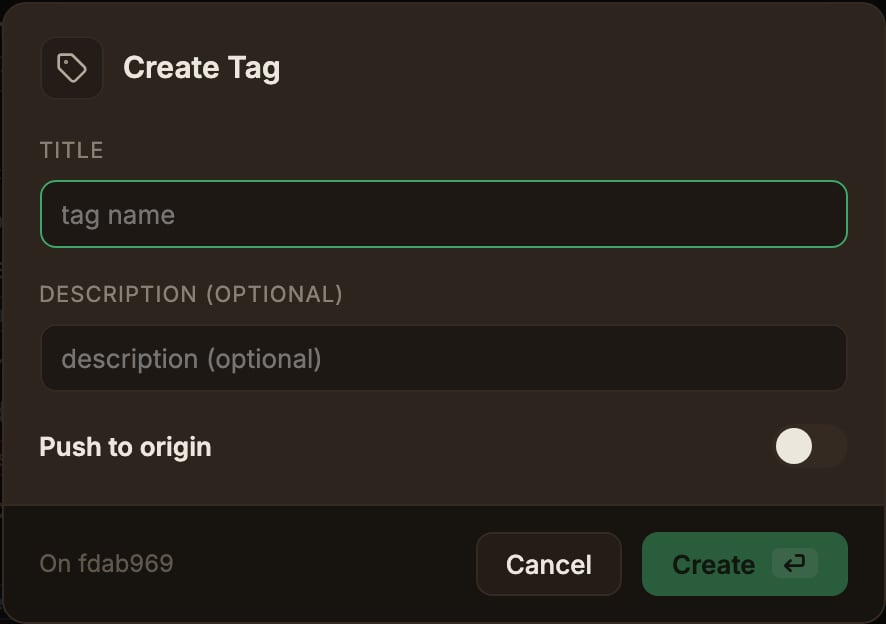
커밋을 우클릭하고 **태그 만들기…** 를 선택합니다.
* **제목(Title)** 은 태그 이름입니다. 필수입니다.
* **설명 (선택)** 을 비우면 lightweight 태그, 채우면 annotated 태그가 됩니다.
* **origin에 Push** 를 켜면 만들면서 그 리모트에도 올립니다.
라벨에는 실제로 푸시할 리모트 이름이 들어가며, 저장소의 [기본 리모트](/ko/remote/remotes#기본-리모트-지정)이고 없으면 `origin` 입니다.
태그는 브랜치에 속하지 않습니다. 브랜치별 추적 설정은 여기에 관여하지 않습니다.
설정된 리모트가 하나도 없으면 이 토글은 나타나지 않습니다.
 ## 태그 삭제
태그 배지가 붙은 커밋을 우클릭하고 태그 서브메뉴에서 **삭제** 를 선택합니다.
**origin에서도 삭제(Also delete on origin)** 토글은 설정된 리모트 모두에 삭제를 시도하며(라벨에도 그 리모트가 모두 나열됩니다), 태그가 없는 리모트에서는 Git 에러가 알림으로 표시됩니다.
## 태그 삭제
태그 배지가 붙은 커밋을 우클릭하고 태그 서브메뉴에서 **삭제** 를 선택합니다.
**origin에서도 삭제(Also delete on origin)** 토글은 설정된 리모트 모두에 삭제를 시도하며(라벨에도 그 리모트가 모두 나열됩니다), 태그가 없는 리모트에서는 Git 에러가 알림으로 표시됩니다.